Intro
Trade journal companion for documenting, organizing, and analyzing your trading performance with markdown notes, screenshot galleries, and detailed statistics.
Initial Configuration
Three paths connect ThinkPad to your data.
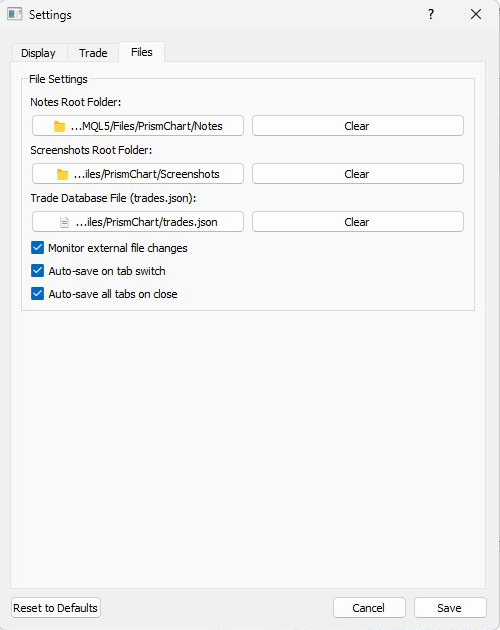
If you used the installer, these paths are configured automatically. For manual installations, open Settings with the gear button and navigate to the Files tab to set them:
- Notes Root Folder - Where your .md trade notes are stored
- Screenshots Root Folder - Where your chart screenshots are saved
- Trade Database File - Path to your MT5 export (trades.json)
Timezone Setup
Convert broker timestamps to your local time.
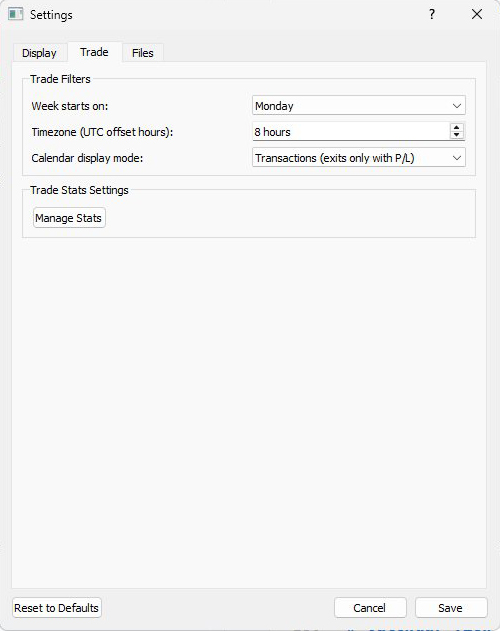
Switch to the Trade tab in Settings. Set the UTC offset to match your timezone - Pacific Time uses -8, Eastern uses -5. This ensures all trade times display correctly when reviewing your history.
Week Start
Choose when your trading week begins.
Select Monday or Sunday in the Trade tab. This affects how the calendar view groups and calculates weekly statistics.
Spot something off? Open an issue